
The Settings Page in FluidChords2 allows you to customize plugin behavior, MIDI preferences, engine performance, and visual appearance.
It’s divided into the following main sections:
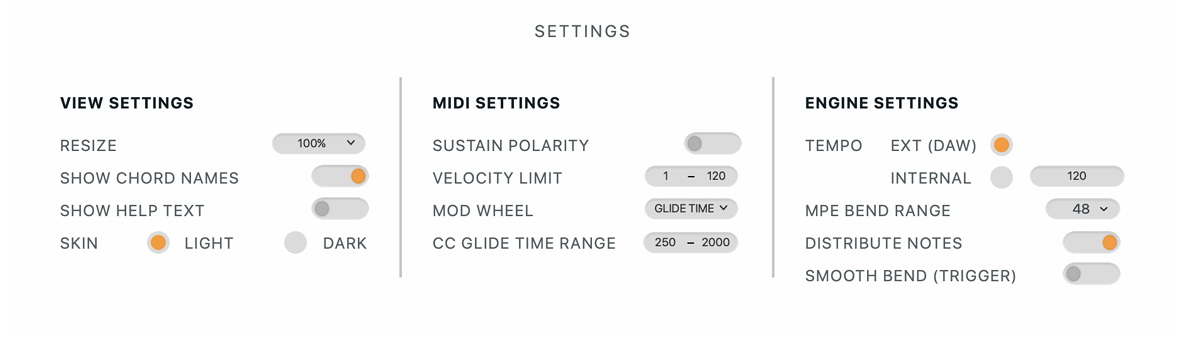
View Settings
● Resize: Adjust the interface size for different screen resolutions. Options: 80%, 90%, 100%, 120%
● Show Chord Names: Displays the detected name of the currently triggered chord. Enabled by default.
● Show Help Text: Toggle on-screen help prompts and tooltips.
● Theme: Switch between Light and Dark modes for visual preference.
MIDI Settings
● Sustain Polarity: Invert sustain pedal behavior if it functions in reverse (pressed = off, released = on).
● Velocity Limit: Caps the incoming MIDI velocity values to control dynamics.
● Mod Wheel: Assign the Mod Wheel to control various parameters in real time. A routing selector lets you choose between: Sound,
Playtime, Flow, and Strum — allowing expressive control over different aspects of performance.
CC Glide Time Range: Set the minimum and maximum range for glide time when it’s being controlled via the Mod Wheel.
Engine Settings
● Tempo Source:
Choose between:
○ External DAW Tempo (default)
○ Internal Tempo – manually set when in standalone mode
● MPE Bend Range: Defines the pitch bend range for MPE expression.
○ Default: 48 semitones
○ Adjustable up to 96 semitones for extended pitch movement
○ Set this based on the range supported by your hosted plugin
Advanced Settings
● Distribute Notes : Ensures consistent polyphonic with different note counts in a chord.
○ Fluid Chords 2 always plays the maximum number of notes found in all chord triggers(e.g.,6).
○ If a chord trigger has only 3 notes, all 6 notes will pitch down to match those 3notes using MPE.
○ As you bend to a chord with more notes (e.g., 6), the voices will expand and bend accordingly to match the new chord. This allows smooth, full-range chord bending even in DAWs that don’t support overlapping MIDI notes (like Ableton Live). The only drawback is that a 3-note chord may sound louder than intended, since all 6 voices are being pitched to just 3 notes.
● Smooth Bend (Trigger Mode): When bending from one chord to another in Trigger mode, if a new chord is triggered during the bend, it
seamlessly transitions to the newly triggered chord without cutting off the current motion.