
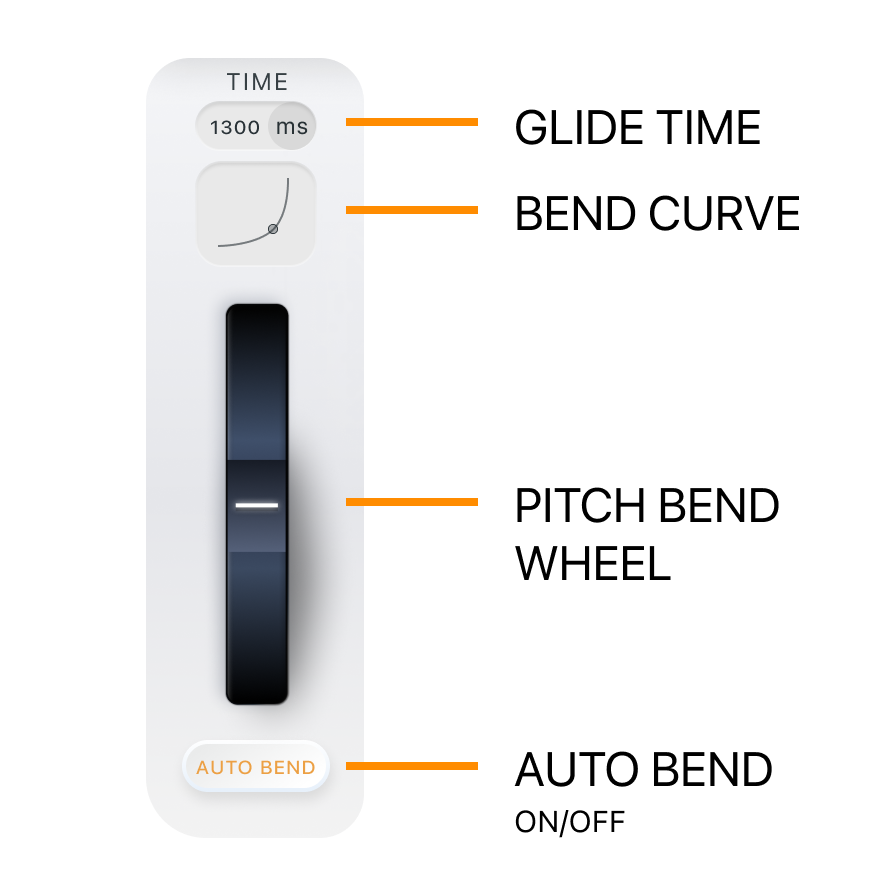
The Auto Bend section in FluidChords2 replaces the need for manually using a pitch bend wheel on your keyboard.
Instead of performing bends in real time, FluidChords2 automates the bending process between chords, giving you smooth, expressive transitions with full control over timing and movement.
Auto Bend (On/Off):
Turns the automatic chord bending feature on or off.
● On: Chords bend automatically based on your settings.
● Off: You must use the pitch bend wheel to manually control the transition.
Note: Glide Time and Bend Curve only work when Auto Bend is enabled.
Glide Time:
Sets the duration of the automatic bend between chords. You can choose between:
● Milliseconds (ms): Enter a custom time for the glide.
● DAW Sync: Sync the bend to your project’s tempo using musical values (e.g., 1/4 note, 1/2 note), so your bends stay locked to the groove.
Bend Curve:
Shapes the movement of the bend across time. Rather than a flat, even transition, bend curves let you control how the notes behave during the glide:
● A slow-rise curve starts gently and accelerates, creating an emotional, expressive feel.
● A fast-rise curve begins quickly and eases into the next chord, adding punch and immediacy. This is similar to how instruments naturally approach pitch—giving you musical control over the character of the bend.
Strum & Flow (Advanced Chord Bending Controls)
Strum and Flow control how individual notes within a chord bend from one to another, allowing for more expressive and complex transitions.
● Strum: Offsets the timing between notes during the bend. Higher Strum values introduce more delay between each note’s movement
● Flow: Controls the directional behavior of the note transitions during a chord bend.
○ At low Flow, notes bend to the closest possible note in the next chord.
○ At high Flow, notes bend to the farthest possible note, creating wider, more dramatic motion.